Tuesday, January 25, 2011

Uploading Your Artwork Just Got Easier!


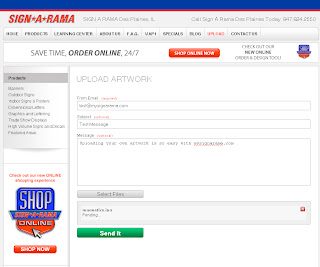
Uploading your own artwork to us at mysignarama.com just got a whole lot easier! With our new "upload" tab, our customers are now able to easily send us their own files right from our website.

Here's how it works:
  1. Click the "Upload" tab located at the top of the page. Since it's a main tab at the top, it's on every page of mysignarama.com.
  2. Fill in your e-mail address in the top field, and if you would like, enter a subject and you can also add a message as well.
  3. Click the "Select Files" button. This will bring up a directory of the files on your computer.
  4. Select the file(s) you would like to upload. You can choose more than one at a time.
  5. Click "Open." You will now see your file(s) appear at the bottom of the web page.
  6. Click the "Send It" button and a progress bar will appear on each file until the upload is complete.
  7. Once your files have been uploaded, you will see a message confirming that your files have been uploaded.
The Upload feature is located along the tabs across the top of every page on mysignarama.com or you can go straight to mysignarama.com/upload

Tuesday, January 18, 2011

Facebook Fan Monthly Special - January 2011


15 % off all magnetic signs all January long for our Facebook Fans! Just visit our Facebook page, and click "Like" to be eligible to receive our monthly discounts and specials! You must be a Facebook Fan to receive the discount.

Visit the Redesigned MySignarama.com!


We are excited to announce that we have redeisgned our website mysignarama.com! You should find the new site to be very easy to navigate and the new design makes it easier for us to keep our customers updated with new products and specials! Visit mysignarama.com and let us know what you think!

Also, visit us on Facebook and become a fan to receive special offers and discounts!

Wednesday, October 13, 2010

We are now on Facebook!


Sign-A-Rama Des Plaines is proud to announce that we have finally launched our Facebook page. We have found Facebook to be a great way to keep our customers informed of the latest happenings with our business. We have begun by posting some pictures of recent signs we have done. We will continue updating our gallery and if you have any pictures of signs we have done for you, we would be happy to add them to our page. We will also be offering special deals and discounts to our Facebook friends. Facebook is also a great way for us to quickly inform our customers of new products we carry. Go to our Facebook page and click "Like" to receive our updates and special offers!

mysignarama.com

Thursday, August 26, 2010

Online Ordering Now Available!


Sign-A-Rama Des Plaines is proud to announce our new online ordering service! Now, through mysignarama.com, you can order your own custom signs from the comfort of your own computer desk. Our online service has a great design tool for customers that like to do the designing themselves, but you can also upload your own artwork or you can have us do the designing for you. We can also ship your order right to your doorstep or you can pick up your order at our store. Check out our new online ordering service today!

www.mysignarama.com

Wednesday, May 27, 2009

Good Luck Overseas!


Being in the sign business for over 17 years now, we've done quite a variety of signs. I don't think any of them had quite the same impact for us personally as the vinyl banner shown above, printed for the Colorado Army National Guard 3rd Battalion 157th Field Artillery. Normally for sign of the week, we highlight a sign we produced recently. This time around, we want to highlight the men and women this sign was produced for. When we found out these brave men and women would be going overseas for Operation Iraqi Freedom, we couldn't have been prouder to be producing a banner for them. Take a moment to salute the men and women you see in the picture above. Sign-A-Rama Des Plaines would like to wish you all the best of luck during Operation Iraqi Freedom. Come home safe!


.... and on the lighter side

Wednesday, April 15, 2009

How to Measure for Your Graphics


This article will help you to measure the available space for your graphics. There are several things to keep in mind when you measure.

1. Measure the total area you wish to cover, not the total space available. For example, if you're ordering a window graphic for a 30"w x 72"h window, but you only want the graphic to be 24"h, give us the smaller dimension rather than the total window size.

2. Error on the small side. If you have a 30"w window, don't use the full 30". Your graphic will look much better if it's slightly smaller than your window, rather than being too big. In this example, we would suggest ordering a 27" - 28"w graphic to keep it from looking too crowded.

3. Look for obstructions. Is there a door handle in the way? Maybe an existing decal? If you have something in the way of your graphic, you can't consider that area to be "available space." Take obstructions into account when ordering your graphic as we will not know where the obstructions will be on your specific window, vehicle, etc.

Here we have highlighted the areas representing the "available space." These are the open areas on this vehicle that the customer wanted their graphics to go in. Notice on the right door that the available space is much smaller to account for the license plate area. Also notice on the left door that the available area is also limited by the existing badges from Chevrolet. Also notice the graphics don't go completely from edge-toedge of the available space to avoid a crowded look to the graphics.